Introduction
A modern, feature-rich React Admin Dashboard built with React 19, TypeScript, and Tailwind CSS — packed with advanced complex logic features that go far beyond a typical template.
Tech Stack
Installation
Get up and running in minutes.
package-lock.json is included — use npm ci for reproducible installs.
Step 1: Extract the Package
After downloading from ThemeForest, extract the ZIP file to your desired location.
Step 2: Install Dependencies
cd adminex
npm ci
Step 3: Start Development Server
npm run devhttp://localhost:5173
Step 4: Build for Production
npm run build
npm run preview
Requirements
Install these before setting up Adminex. Matching these versions prevents the most common installation errors.
| Tool | Minimum Version | Recommended |
|---|---|---|
| Node.js | 18.0.0+ | 20 LTS |
| npm | 9.0.0+ | Latest (bundled with Node) |
| yarn | 1.22.0+ | Optional alternative |
| pnpm | 8.0.0+ | Optional alternative |
Reproducible installs: This package includes package-lock.json. Always run npm ci (not a fresh resolve) so every buyer gets the same dependency versions.
Folder Structure
Organized and scalable architecture.
adminex/
├── public/
│   └── assets/           # Static assets
│       ├── avatars/
│       ├── blogs/
│       ├── products/
│       └── logo/
├── src/
│   ├── components/       # Reusable components
│   │   ├── charts/
│   │   ├── common/
│   │   ├── dashboard/
│   │   ├── features/     # Feature page shell
│   │   └── ui/           # Design system primitives
│   ├── context/          # React Context
│   ├── data/             # Mock data
│   ├── features/         # Advanced feature modules
│   │   ├── query-builder/
│   │   ├── real-time-simulation/
│   │   ├── rule-engine/
│   │   ├── smart-insights/
│   │   ├── task-scheduler/
│   │   └── workflow-builder/
│   ├── hooks/            # Custom hooks
│   ├── i18n/             # Internationalization
│   │   └── locales/
│   ├── layouts/          # Page layouts
│   ├── pages/            # Page components
│   ├── routes/           # Router config
│   ├── styles/           # Global CSS
│   └── types/            # TypeScript types
├── package.json
├── vite.config.ts
└── tsconfig.json
Key Features
Everything you need to build amazing admin apps — and more.
6 Advanced Features
Rule Engine, Workflow Builder, Task Scheduler & more.
Fully Responsive
Works on all screen sizes from mobile to 4K.
Dark Mode
Beautiful dark theme with system detection.
10 Languages
Built-in i18n with RTL support.
6 Color Themes
Blue, Purple, Green, Orange, Red, Cyan.
7+ Chart Types
Area, Bar, Line, Pie, Radar, Candlestick & more.
RTL Support
Full right-to-left support for Arabic, Urdu, Hebrew.
Dashboards
4 unique dashboard layouts.
Applications
8 full-featured applications.
Advanced Features
6 complex logic features with production-grade architecture — not just UI, but real engines and builders.
Rule Engine
Visual rule builder with conditional logic, nested groups, and real-time evaluation.
Query Builder
Dynamic query construction with drag-and-drop fields, operators, and SQL/JSON preview.
Real-Time Simulation
Live data streaming dashboard with configurable sources and real-time charts.
Smart Insights
AI-powered analytics with anomaly detection, trend analysis, and actionable recommendations.
Workflow Builder
Visual workflow designer with node-based canvas, templates, and conditional branching.
Task Scheduler
Advanced task management with Gantt charts, dependency graphs, and cron scheduling.
Feature Architecture
Each feature follows a modular, self-contained architecture:
src/features/{feature-name}/
├── types.ts          # TypeScript interfaces
├── engine.ts         # Core business logic
├── config.ts         # Default configurations
├── use{Feature}.ts   # Custom React hook
└── components/       # Feature UI components
    ├── {Feature}Dashboard.tsx
    └── ...
Screenshots
The same demo previews shown on the Adminex landing page — dashboards and app pages with polished UI patterns.
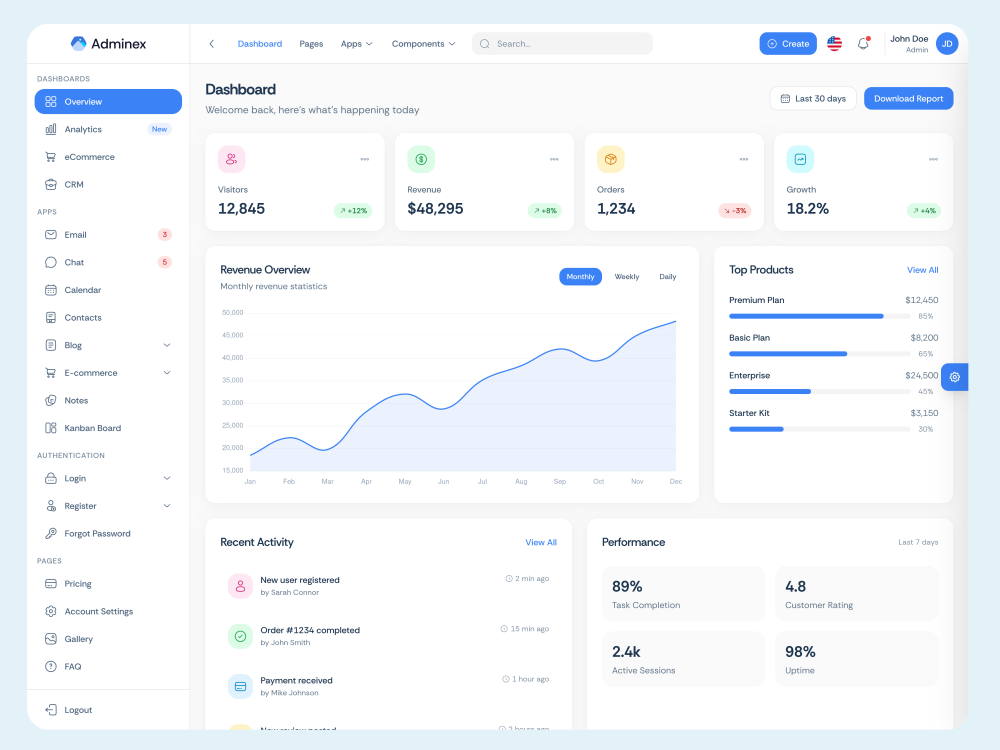
Overview (Light)
Clean, bright layout for daily work.
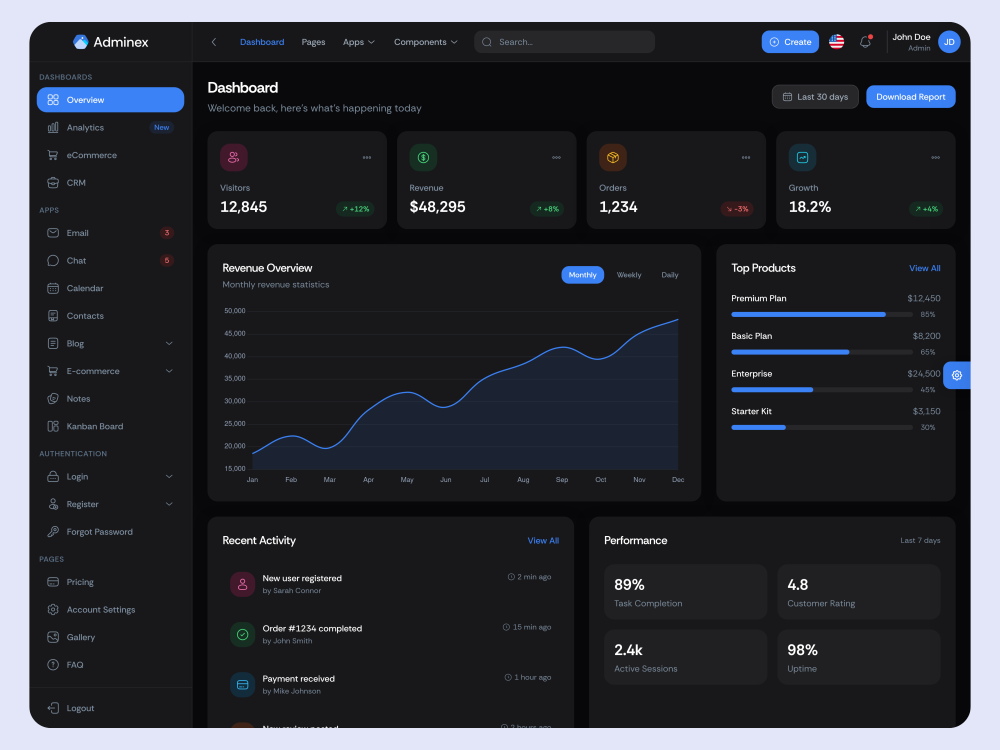
Overview (Dark)
Optimized contrast for dark themes.
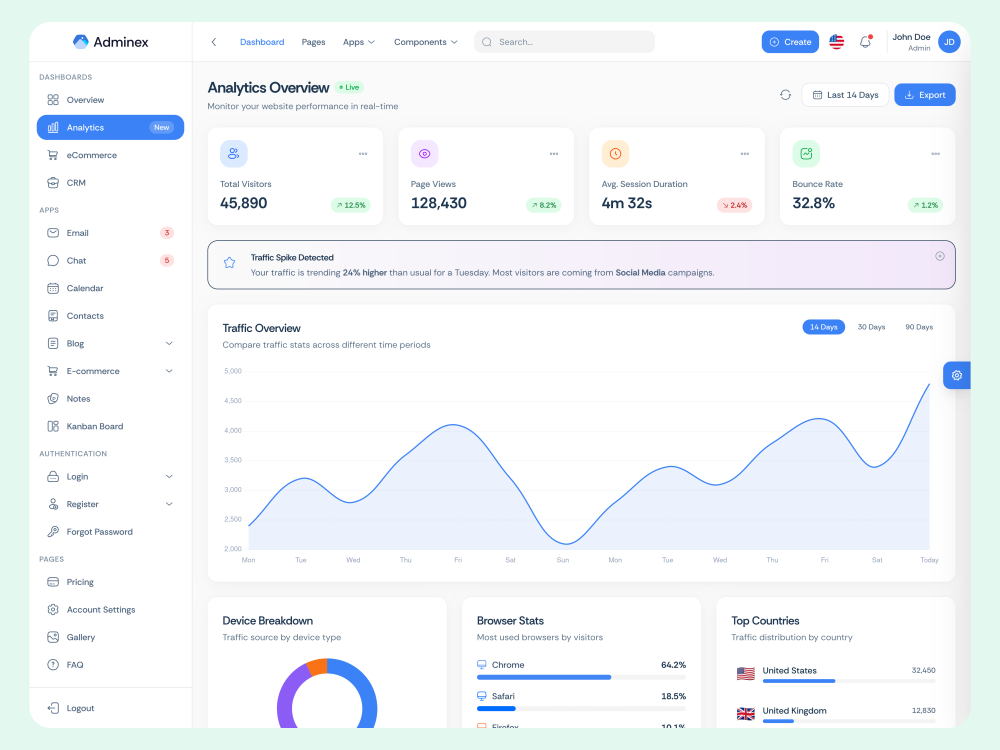
Analytics
KPIs, traffic sources, and trends.
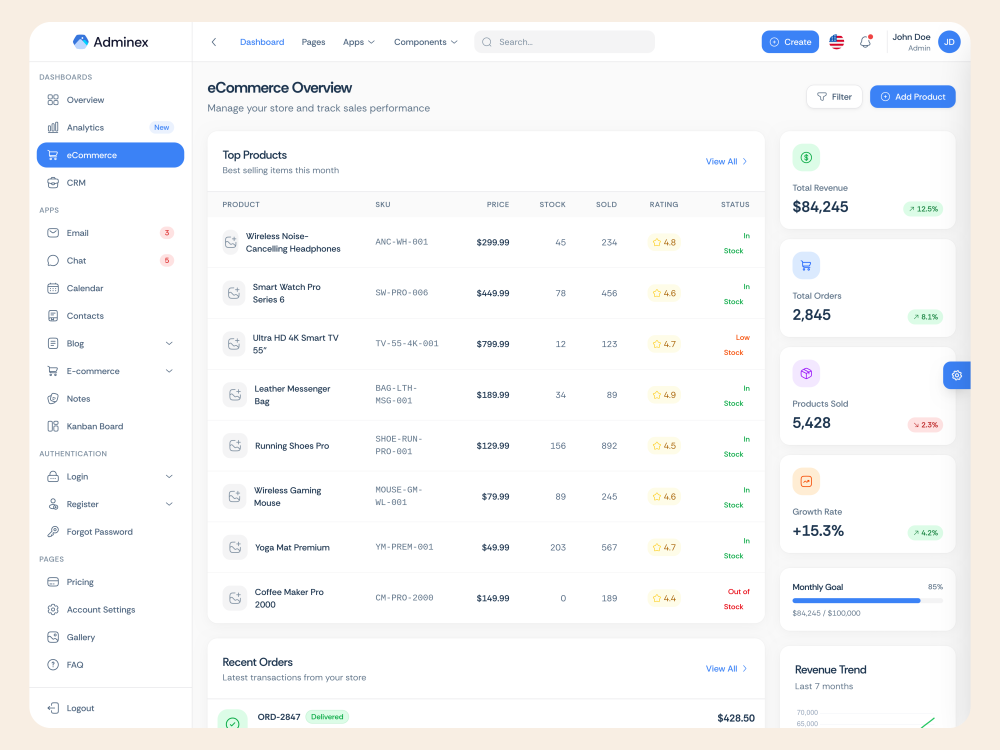
E-commerce
Orders, revenue, and conversion insights.
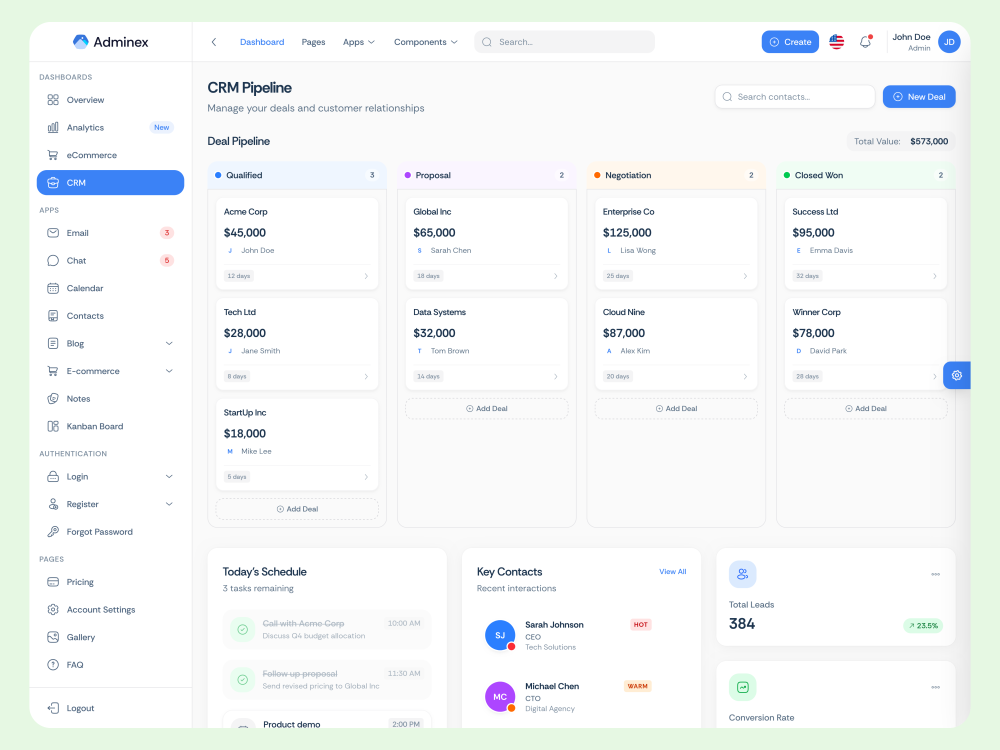
CRM
Pipeline overview and deal tracking.
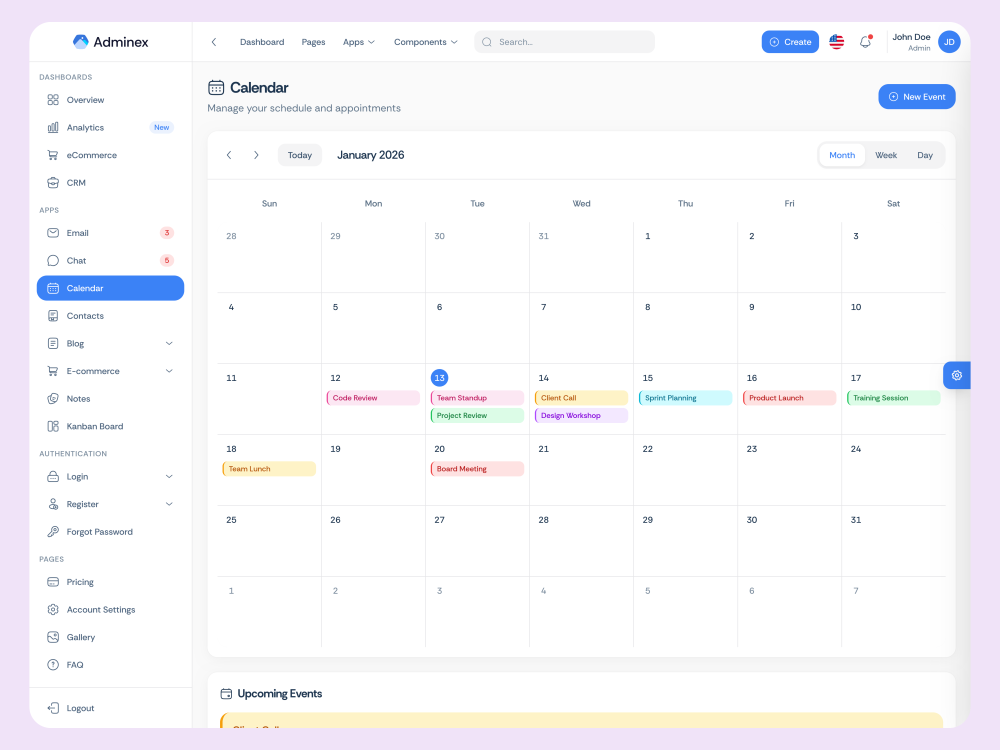
Calendar
Schedule, events, and productivity.
Theming
6 built-in color themes with customizable CSS variables.
Available Color Themes
Blue
#3b82f6
Default theme
Purple
#ec4899
Pink-based palette
Green
#22c55e
Fresh & eco-friendly
Orange
#f97316
Warm & energetic
Red
#ef4444
Bold & attention-grabbing
Cyan
#06b6d4
Cool & modern
Change Theme Color
import { useTheme } from '@/hooks/useTheme';

const { setColor } = useTheme();

// Change to any available theme
setColor('blue');    // Default
setColor('purple');  // Pink-based
setColor('green');   // Fresh
setColor('orange');  // Warm
setColor('red');     // Bold
setColor('cyan');    // Cool
Theme Implementation
Colors are defined in src/types/theme.ts and applied via CSS variables:
-
--theme-primary- Main theme color -
--theme-accent- Complementary accent color -
Persists to localStorage automatically -
Works seamlessly with dark mode
Dark Mode
Light, Dark, or System preference.
Toggle Dark Mode
import { useTheme } from '@/hooks/useTheme';

const { theme, setTheme } = useTheme();

setTheme({ ...theme, mode: 'dark' });   // Dark
setTheme({ ...theme, mode: 'light' });  // Light
setTheme({ ...theme, mode: 'system' }); // System
RTL Support
Right-to-left language support.
setTheme({ ...theme, direction: 'rtl' });Languages
10 built-in languages.
Add New Language
// 1. Create: src/i18n/locales/ko.json
// 2. Register in src/i18n/index.ts
import ko from './locales/ko.json';
const locales = { ...existingLocales, ko };
User Guide
A non-technical overview for site owners and admins using the template demo — no coding required.
Navigating the sidebar
Use the left sidebar to switch between Dashboards, Applications, Forms, Tables, Charts, and Advanced Features. Click any menu item to open that page. On mobile, tap the menu icon in the header to open the sidebar.
Changing theme and appearance
Click the palette icon in the top header to open the Theme Customizer. From there you can switch between light and dark mode, pick a color preset, change sidebar layout (vertical or horizontal), and toggle card style. Your choices are saved automatically in the browser.
Switching language
Use the language dropdown in the header to switch between 10 built-in languages. Arabic and Urdu automatically enable right-to-left (RTL) layout.
Working with demo data
All dashboards, apps, and tables use sample (mock) data so you can explore every screen immediately. To connect real data, your developer will replace the mock files in src/data/ or wire pages to your API.
Smart Insights note
The Smart Insights page demonstrates AI-style analytics with sample metrics. Connecting it to a live AI service requires your own API keys — see Environment Variables.
Environment Variables
Adminex runs out of the box with no environment variables. Use a .env file when you connect optional services.
Setup
- Copy
.env.exampleto.envin the project root. - Uncomment and fill in only the variables you need.
- Restart the dev server (
npm run dev) after changes.
| Variable | Required | Description |
|---|---|---|
| VITE_APP_BASE_URL | No | Public base URL when deploying to a sub-path or custom domain. |
| VITE_API_BASE_URL | No | Backend API endpoint when replacing mock data with a live server. |
| VITE_AI_API_KEY | For live AI only | API key for Smart Insights AI provider. Not included — buyer must supply their own key. Usage may incur external costs. |
| VITE_AI_API_URL | For live AI only | AI provider endpoint (e.g. OpenAI-compatible API URL). |
| VITE_AI_MODEL | For live AI only | Model name to use for AI analysis requests. |
Security: Never commit your .env file or expose API keys in client-side code shipped to production without proper proxying. The .env file is gitignored by default.
Troubleshooting
Solutions for the most common installation and runtime issues.
npm install fails with EACCES or permission errors
Do not use sudo npm install. Fix npm permissions by using a node version manager (nvm, fnm) or configure npm to use a user-owned directory. See the official npm docs on resolving EACCES errors.
"Unsupported engine" or Node version warnings
Upgrade Node.js to 18.0.0 or higher. Check your version with node -v. We recommend Node 20 LTS from nodejs.org.
Port 5173 is already in use
Another process is using the default Vite port. Stop the other dev server, or run npm run dev -- --port 3000 to use a different port.
Blank page after npm run build
Ensure your web server serves index.html for all routes (SPA fallback). If deploying to a sub-folder, set base in vite.config.ts and configure VITE_APP_BASE_URL.
Dependencies resolve to different versions than expected
Use npm ci instead of npm install. This installs exact versions from package-lock.json. Delete node_modules first if you previously ran a plain install.
TypeScript errors after modifying feature engines
Run npm run build to see full type errors. Feature engine files in src/features/ are fully type-checked — avoid adding @ts-nocheck directives.
FAQ
Frequently asked questions from buyers.
Do I need a backend to run Adminex?
No. The template runs entirely on the frontend with mock data. Connect your own API when you are ready for production.
Can I use yarn or pnpm instead of npm?
Yes. yarn 1.22+ and pnpm 8+ are supported. A package-lock.json is provided for npm users; yarn/pnpm will generate their own lockfile on first install.
Does Smart Insights cost extra to use?
The demo is free to explore. If you connect Smart Insights to a live AI provider, you must supply your own API key and pay any usage fees charged by that provider. Those costs are not included with this item.
How do I change the primary color?
Use the Theme Customizer in the header, or programmatically call setColor() from the useTheme hook. See the Theming section for details.
Is TypeScript required?
The project is written in TypeScript. You can build with npm run build which type-checks all source files including feature engines. JavaScript files are also supported by the toolchain but not provided out of the box.
What support is included?
Bug fixes and installation help for verified buyers. Custom modifications and third-party integrations are not covered. See the Support section.
Changelog
Version history.
Version 1.2.0
LatestJune 18, 2026
-- Upgrade all core dependencies to their latest stable versions (React 19, Vite 8, TypeScript 6, Tailwind CSS 4)
-- Refreshed visual design across the entire template — buttons, cards, and form fields now look and feel consistent on every page for a more polished, production-ready admin experience
-- Smarter form controls — inputs, selects, and search fields are now the same size and style throughout the app, with custom-styled dropdowns and support for prefix/suffix icons (search, currency, and more)
-- Feature pages redesigned — Rule Engine, Query Builder, Workflow Builder, Task Scheduler, Smart Insights, and Real-Time Simulation now share a clean, unified layout with clear headers, tab navigation, and overview stat cards
-- Auth screens refreshed — Login, Register, and Forgot Password use a modern split-screen layout with product branding on one side and the form on the other
-- Landing page hero upgraded — restored the smooth orbit animation around the dashboard preview for a more engaging first impression
-- Performance improvements and bug fixes
Version 1.0.0
January 27, 2025
-- Initial release — a complete React admin dashboard template ready for production
-- 4 dashboard layouts: Overview, Analytics, CRM, and E-commerce
-- 8 full demo applications: Email, Chat, Calendar, Kanban, Notes, Contacts, Blog, and E-commerce
-- 6 advanced features with real business logic: Rule Engine, Query Builder, Real-Time Simulation, Smart Insights, Workflow Builder, and Task Scheduler
-- 7 chart types, dark mode, 10 languages with RTL support, and 6 color themes
-- 70+ AI-generated images included
Support
Get help when you need it.
If this documentation doesn't answer your questions, contact us via:
We are located in GMT +5:30 time zone and answer all questions within 12-24 hours on weekdays. In rare cases, waiting time can be up to 48 hours.
Support only extends to verified buyers for bugs and errors. Custom modifications or third-party implementations are not included.
Don't forget to Rate ⭐⭐⭐⭐⭐
Go to your Codecanyon Profile → Downloads Tab → Rate & Review.
Thank you for your support!